- Published on
Practical Guide: Build A Subscription Form With Tailwind CSS
- What is Tailwind CSS?
- The description of Subscription Form ui component
- Why use Tailwind CSS to create a Subscription Form ui component?
- The preview of Subscription Form ui component.
- The source code of Subscription Form ui component.
- How to create a Subscription Form with Tailwind CSS?
- Conclusion
In today's digital world, subscription forms have become a crucial component of every website. They are used to capture user information and build email lists, which can be used for marketing purposes. In this article, we will explore how to build a subscription form using Tailwind CSS, a popular utility-first CSS framework.
What is Tailwind CSS?
Tailwind CSS is a utility-first CSS framework that provides pre-defined classes to style HTML elements. It allows developers to create custom designs quickly and efficiently by using pre-defined classes. Tailwind CSS is easy to learn and use, making it a popular choice among developers.
The description of Subscription Form ui component
A subscription form is a user interface component that allows users to enter their personal information, such as name and email address, to subscribe to a newsletter or other marketing materials. Subscription forms are typically found on websites and are used to build email lists.
Why use Tailwind CSS to create a Subscription Form ui component?
Tailwind CSS provides pre-defined classes that make it easy to create custom designs quickly and efficiently. It eliminates the need for writing custom CSS, which can be time-consuming and error-prone. Additionally, Tailwind CSS is easy to learn and use, making it an ideal choice for developers of all skill levels.
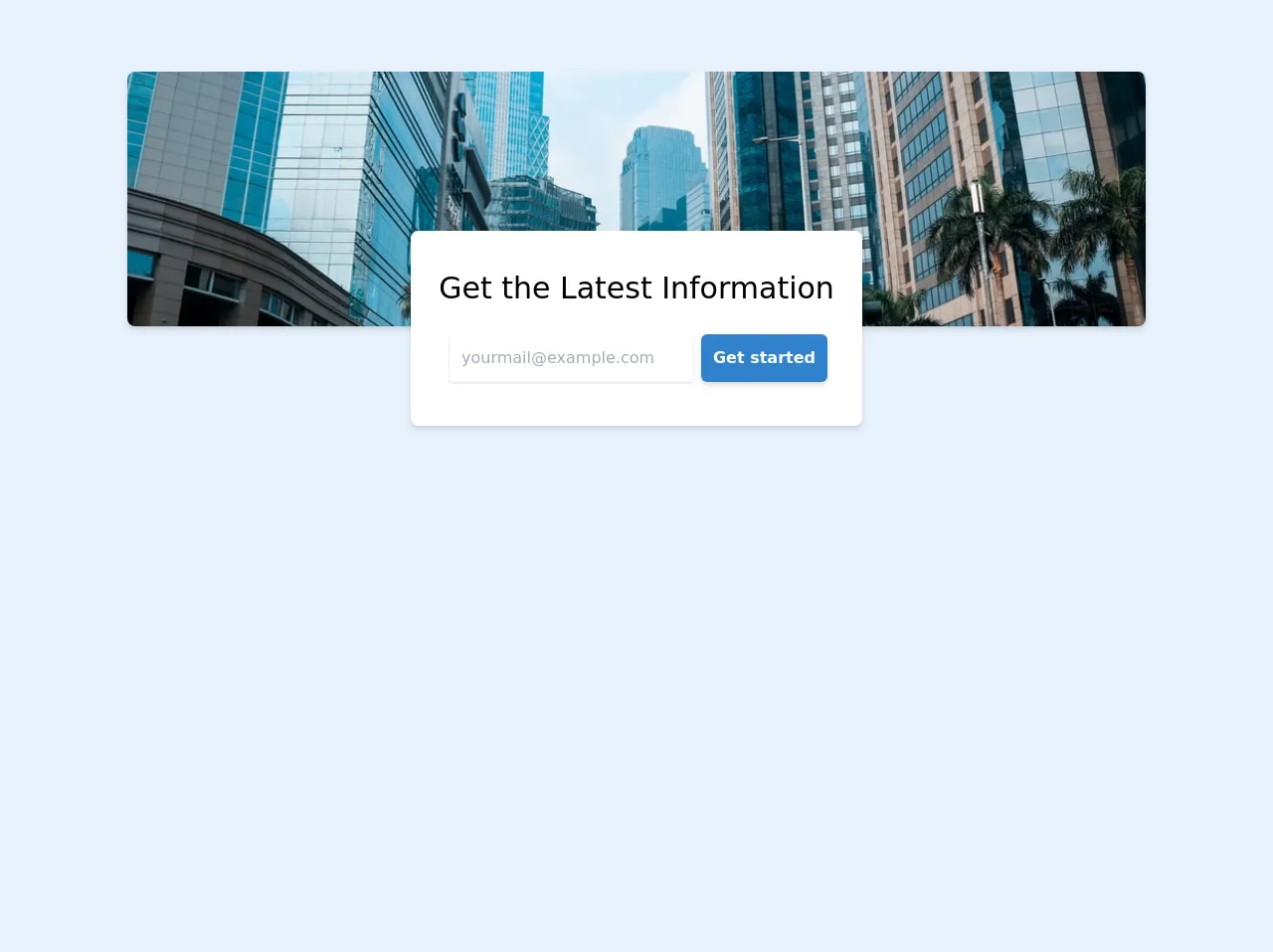
The preview of Subscription Form ui component.
To create a subscription form using Tailwind CSS, we will use the following HTML code:
<form class="bg-white shadow-md rounded px-8 pt-6 pb-8 mb-4">
  <div class="mb-4">
    <label class="block text-gray-700 font-bold mb-2" for="name">
      Name
    </label>
    <input
      class="shadow appearance-none border rounded w-full py-2 px-3 text-gray-700 leading-tight focus:outline-none focus:shadow-outline"
      id="name"
      type="text"
      placeholder="Enter your name"
    />
  </div>
  <div class="mb-4">
    <label class="block text-gray-700 font-bold mb-2" for="email">
      Email
    </label>
    <input
      class="shadow appearance-none border rounded w-full py-2 px-3 text-gray-700 leading-tight focus:outline-none focus:shadow-outline"
      id="email"
      type="email"
      placeholder="Enter your email"
    />
  </div>
  <div class="mb-4">
    <button
      class="bg-blue-500 hover:bg-blue-700 text-white font-bold py-2 px-4 rounded focus:outline-none focus:shadow-outline"
      type="button"
    >
      Subscribe
    </button>
  </div>
</form>
This code will create a subscription form with two input fields for name and email, and a subscribe button.
Free download of the Subscription Form's source code
The source code of Subscription Form ui component.
To create the subscription form using Tailwind CSS, we will use the following classes:
bg-whiteto set the background color of the form to white.shadow-mdto add a shadow effect to the form.roundedto add rounded corners to the form.px-8to add padding to the left and right sides of the form.pt-6to add padding to the top of the form.pb-8to add padding to the bottom of the form.mb-4to add margin to the bottom of the form.blockto display the label and input fields on separate lines.text-gray-700to set the color of the label text to gray.font-boldto make the label text bold.appearance-noneto remove the default appearance of the input fields.borderto add a border to the input fields.w-fullto set the input fields to full width.py-2to add padding to the top and bottom of the input fields.px-3to add padding to the left and right sides of the input fields.leading-tightto set the line height of the input fields.focus:outline-noneto remove the outline when the input fields are focused.focus:shadow-outlineto add a shadow effect when the input fields are focused.bg-blue-500to set the background color of the subscribe button to blue.hover:bg-blue-700to change the background color of the subscribe button when hovered.text-whiteto set the color of the subscribe button text to white.font-boldto make the subscribe button text bold.py-2to add padding to the top and bottom of the subscribe button.px-4to add padding to the left and right sides of the subscribe button.roundedto add rounded corners to the subscribe button.focus:outline-noneto remove the outline when the subscribe button is focused.focus:shadow-outlineto add a shadow effect when the subscribe button is focused.
<!-- start -->
    <div class="container flex flex-col justify-center items-center mx-auto my-8 py-10">
        <div style="background-image: url(https://images.unsplash.com/photo-1538582709238-0a503bd5ae04?ixlib=rb-1.2.1&ixid=eyJhcHBfaWQiOjEyMDd9&w=1000&q=80)"
            class="max-w-5xl bg-gray-300 h-64 w-full rounded-lg shadow-md bg-cover bg-center">
        </div>

        <!-- Card -->
        <div class="bg-white -mt-24 shadow-md rounded-lg overflow-hidden">
            <div class="items-center justify-between py-10 px-5 bg-white shadow-2xl rounded-lg mx-auto text-center">
                <div class="px-2 -mt-6">
                    <div class="text-center">
                        <h1 class="font-normal text-3xl text-grey-800 font-medium leading-loose my-3 w-full">Get the
                            Latest Information</h1>
                        <div class="w-full text-center">
                            <form action="#">
                                <div class="max-w-sm mx-auto p-1 pr-0 flex items-center">
                                    <input type="email" placeholder="yourmail@example.com"
                                        class="flex-1 appearance-none rounded shadow p-3 text-grey-dark mr-2 focus:outline-none">
                                    <button type="submit"
                                        class="bg-blue-600 text-white text-base font-semibold rounded-md shadow-md hover:bg-indigo-600 p-3">Get
                                        started</button>
                                </div>
                            </form>
                        </div>
                    </div>
                </div>
            </div>
        </div>
        <!-- end card -->

    </div>
    <!-- end -->
How to create a Subscription Form with Tailwind CSS?
To create a subscription form with Tailwind CSS, follow these steps:
- Create a new HTML file and add the HTML code above.
- Add the Tailwind CSS CDN to the head of your HTML file:
<link href="https://cdn.jsdelivr.net/npm/tailwindcss@2.2.15/dist/tailwind.min.css" rel="stylesheet">
- Save your HTML file and open it in a web browser.
You should now see a subscription form with two input fields for name and email, and a subscribe button.
Conclusion
In this article, we have explored how to create a subscription form using Tailwind CSS. Tailwind CSS provides pre-defined classes that make it easy to create custom designs quickly and efficiently. By following the steps outlined in this article, you can create a subscription form for your website in no time.