- Published on
How To Build A Ojas Footer With Tailwind CSS In 6 Easy Steps?
- What is Tailwind CSS?
- The description of Ojas Footer ui component
- Why use Tailwind CSS to create a Ojas Footer ui component?
- The preview of Ojas Footer ui component
- The source code of Ojas Footer ui component
- How to create a Ojas Footer with Tailwind CSS?
- Step 1: Create a new HTML file
- Step 2: Add the Tailwind CSS CDN
- Step 3: Add the Ojas Footer HTML code
- Step 4: Add the Tailwind CSS classes
- Step 5: Customize the Ojas Footer
- Step 6: Preview and test the Ojas Footer
- Conclusion
What is Tailwind CSS?
Tailwind CSS is a utility-first CSS framework that provides a set of pre-defined CSS classes to help you quickly build responsive and customizable user interfaces. It is designed to be highly customizable and easy to use, making it a popular choice for developers who want to create beautiful and functional websites quickly.
The description of Ojas Footer ui component
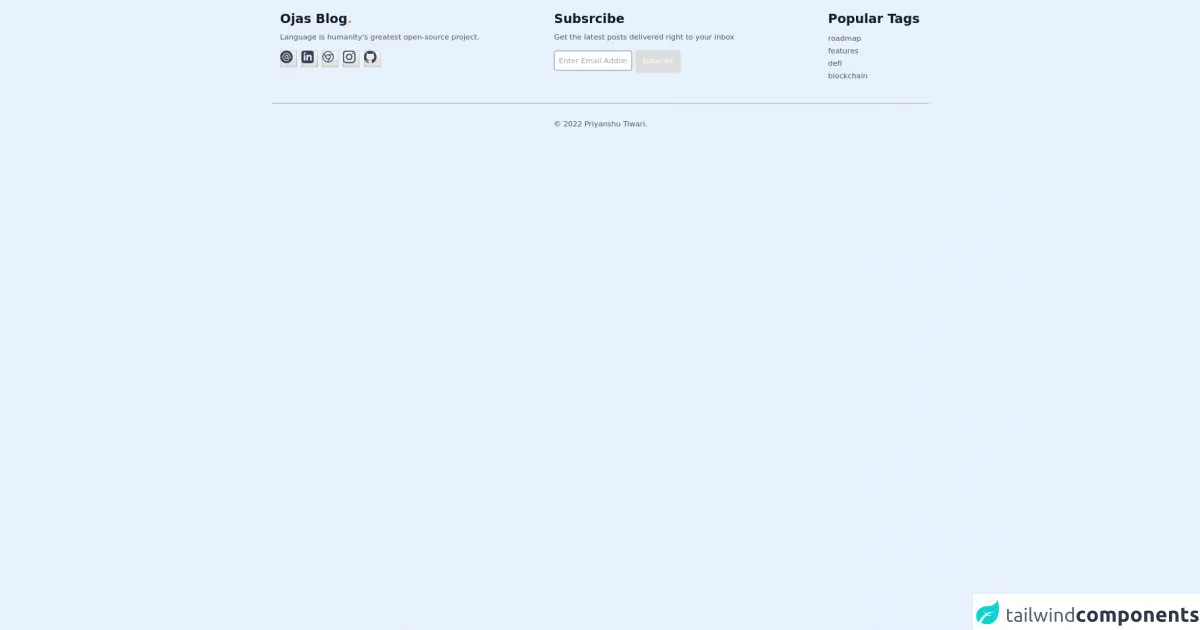
Ojas Footer is a simple and elegant UI component that can be used to display important information about your website or application, such as copyright information, social media links, and contact information. It is designed to be responsive and easy to customize, making it a great choice for any website or application.
Why use Tailwind CSS to create a Ojas Footer ui component?
Tailwind CSS provides a set of pre-defined CSS classes that can be used to quickly and easily create responsive and customizable UI components, such as the Ojas Footer. By using Tailwind CSS, you can save time and effort by not having to write custom CSS code from scratch, and you can ensure that your UI components are consistent and well-designed.
The preview of Ojas Footer ui component
The Ojas Footer UI component is a simple and elegant footer that can be used to display important information about your website or application. It consists of three sections: the copyright section, the social media section, and the contact section.
Free download of the Ojas Footer's source code
The source code of Ojas Footer ui component
The source code for the Ojas Footer UI component is simple and easy to understand. It consists of HTML and CSS code that can be easily customized to fit your needs.
<footer class="font-sans relative pt-5 pb-3 md:pb-6">
<div class="container mx-auto px-4">
<div class="flex flex-wrap">
<div class="flex w-full md:w-5/12">
<div class="text-2xl px-4">
<h3 class="font-bold text-gray-900 dark:text-gray-100">Ojas
Blog<span style="color: #FF7F50;">.</span>
</h3>
<p class="mt-2 mb-4 text-gray-600 dark:text-gray-400 text-sm">
Language is humanity's greatest open-source project.
</p>
<div class="flex-row my-4">
<a class=" h-8 w-8 rounded-full outline-none focus:outline-none"
href='mailto:ahampriyanshu@gmail.com?subject = Greeting&body = Hi there' type="button">
<svg width="24" height="24"
class="transition duration-700 ease-in-out fill-current cursor-pointer text-gray-700 dark:text-gray-400 hover:text-red-500 dark:hover:text-red-500"
xmlns="http://www.w3.org/2000/svg" x="0px" y="0px" viewBox="0 0 512 512"
xml:space="preserve">
<g>
<g>
<path d="M257,210c-24.814,0-45,20.186-45,45c0,24.814,20.186,45,45,45c24.814,0,45-20.186,45-45C302,230.186,281.814,210,257,210z
" />
</g>
</g>
<g>
<g>
<path d="M255,0C114.39,0,0,114.39,0,255s114.39,257,255,257s257-116.39,257-257S395.61,0,255,0z M362,330
c-20.273,0-38.152-10.161-49.017-25.596C299.23,319.971,279.354,330,257,330c-41.353,0-75-33.647-75-75c0-41.353,33.647-75,75-75
c16.948,0,32.426,5.865,45,15.383V195c0-8.291,6.709-15,15-15c8.291,0,15,6.709,15,15c0,33.36,0,41.625,0,75
c0,16.538,13.462,30,30,30c16.538,0,30-13.462,30-30c0-100.391-66.432-150-135-150c-74.443,0-135,60.557-135,135
s60.557,135,135,135c30,0,58.374-9.609,82.061-27.803c15.822-12.078,33.94,11.765,18.281,23.789
C328.353,408.237,293.665,420,257,420c-90.981,0-165-74.019-165-165S166.019,90,257,90c82.897,0,165,61.135,165,180
C422,303.091,395.091,330,362,330z" />
</g>
</g>
<g></g>
<g></g>
<g></g>
<g></g>
<g></g>
<g></g>
<g></g>
<g></g>
<g></g>
<g></g>
<g></g>
<g></g>
<g></g>
<g></g>
<g></g>
</svg>
</a>
<a class="h-8 w-8 rounded-full outline-none focus:outline-none" type="button"
href="https://www.linkedin.com/in/ahampriyanshu/">
<svg class="fill-current transition duration-700 ease-in-out text-gray-700 dark:text-gray-400 hover:text-blue-500 dark:hover:text-blue-500"
role="img" width="24" height="24" viewBox="0 0 24 24"
xmlns="http://www.w3.org/2000/svg">
<title>LinkedIn</title>
<path
d="M19 0h-14c-2.761 0-5 2.239-5 5v14c0 2.761 2.239 5 5 5h14c2.762 0 5-2.239 5-5v-14c0-2.761-2.238-5-5-5zm-11 19h-3v-11h3v11zm-1.5-12.268c-.966 0-1.75-.79-1.75-1.764s.784-1.764 1.75-1.764 1.75.79 1.75 1.764-.783 1.764-1.75 1.764zm13.5 12.268h-3v-5.604c0-3.368-4-3.113-4 0v5.604h-3v-11h3v1.765c1.396-2.586 7-2.777 7 2.476v6.759z" />
</svg>
</a>
<a class="h-8 w-8 rounded-full outline-none focus:outline-none" type="button"
href="https://ahampriyanshu.com">
<svg class="h-6 transition duration-700 ease-in-out text-gray-700 dark:text-gray-400 hover:text-black dark:hover:text-black"
role="img" xmlns="http://www.w3.org/2000/svg" width="24" height="24" viewBox="0 0 24 24"
fill="none" stroke="currentColor" stroke-width="1.5" stroke-linecap="round"
stroke-linejoin="round" class="feather feather-chrome">
<title>Website</title>
<circle cx="12" cy="12" r="10"></circle>
<circle cx="12" cy="12" r="4"></circle>
<line x1="21.17" y1="8" x2="12" y2="8"></line>
<line x1="3.95" y1="6.06" x2="8.54" y2="14"></line>
<line x1="10.88" y1="21.94" x2="15.46" y2="14"></line>
</svg>
</a>
<a class="h-8 w-8 rounded-full outline-none focus:outline-none" type="button"
href="https://www.instagram.com/ahampriyanshu/">
<svg class="fill-current transition duration-700 ease-in-out text-gray-700 dark:text-gray-400 hover:text-pink-600 dark:hover:text-pink-600"
role="img" width="24" height="24" viewBox="0 0 24 24"
xmlns="http://www.w3.org/2000/svg">
<title>Instagram</title>
<path
d="M12 0C8.74 0 8.333.015 7.053.072 5.775.132 4.905.333 4.14.63c-.789.306-1.459.717-2.126 1.384S.935 3.35.63 4.14C.333 4.905.131 5.775.072 7.053.012 8.333 0 8.74 0 12s.015 3.667.072 4.947c.06 1.277.261 2.148.558 2.913.306.788.717 1.459 1.384 2.126.667.666 1.336 1.079 2.126 1.384.766.296 1.636.499 2.913.558C8.333 23.988 8.74 24 12 24s3.667-.015 4.947-.072c1.277-.06 2.148-.262 2.913-.558.788-.306 1.459-.718 2.126-1.384.666-.667 1.079-1.335 1.384-2.126.296-.765.499-1.636.558-2.913.06-1.28.072-1.687.072-4.947s-.015-3.667-.072-4.947c-.06-1.277-.262-2.149-.558-2.913-.306-.789-.718-1.459-1.384-2.126C21.319 1.347 20.651.935 19.86.63c-.765-.297-1.636-.499-2.913-.558C15.667.012 15.26 0 12 0zm0 2.16c3.203 0 3.585.016 4.85.071 1.17.055 1.805.249 2.227.415.562.217.96.477 1.382.896.419.42.679.819.896 1.381.164.422.36 1.057.413 2.227.057 1.266.07 1.646.07 4.85s-.015 3.585-.074 4.85c-.061 1.17-.256 1.805-.421 2.227-.224.562-.479.96-.899 1.382-.419.419-.824.679-1.38.896-.42.164-1.065.36-2.235.413-1.274.057-1.649.07-4.859.07-3.211 0-3.586-.015-4.859-.074-1.171-.061-1.816-.256-2.236-.421-.569-.224-.96-.479-1.379-.899-.421-.419-.69-.824-.9-1.38-.165-.42-.359-1.065-.42-2.235-.045-1.26-.061-1.649-.061-4.844 0-3.196.016-3.586.061-4.861.061-1.17.255-1.814.42-2.234.21-.57.479-.96.9-1.381.419-.419.81-.689 1.379-.898.42-.166 1.051-.361 2.221-.421 1.275-.045 1.65-.06 4.859-.06l.045.03zm0 3.678c-3.405 0-6.162 2.76-6.162 6.162 0 3.405 2.76 6.162 6.162 6.162 3.405 0 6.162-2.76 6.162-6.162 0-3.405-2.76-6.162-6.162-6.162zM12 16c-2.21 0-4-1.79-4-4s1.79-4 4-4 4 1.79 4 4-1.79 4-4 4zm7.846-10.405c0 .795-.646 1.44-1.44 1.44-.795 0-1.44-.646-1.44-1.44 0-.794.646-1.439 1.44-1.439.793-.001 1.44.645 1.44 1.439z" />
</svg>
</a>
<a class="h-8 w-8 rounded-full outline-none focus:outline-none" type="button"
href="http://www.github.com/ahampriyanshu">
<svg class="fill-current transition duration-700 ease-in-out text-gray-700 dark:text-gray-400 hover:text-black dark:hover:text-black"
role="img" width="24" height="24" viewBox="0 0 24 24"
xmlns="http://www.w3.org/2000/svg">
<title>Github</title>
<path
d="M12 .297c-6.63 0-12 5.373-12 12 0 5.303 3.438 9.8 8.205 11.385.6.113.82-.258.82-.577 0-.285-.01-1.04-.015-2.04-3.338.724-4.042-1.61-4.042-1.61C4.422 18.07 3.633 17.7 3.633 17.7c-1.087-.744.084-.729.084-.729 1.205.084 1.838 1.236 1.838 1.236 1.07 1.835 2.809 1.305 3.495.998.108-.776.417-1.305.76-1.605-2.665-.3-5.466-1.332-5.466-5.93 0-1.31.465-2.38 1.235-3.22-.135-.303-.54-1.523.105-3.176 0 0 1.005-.322 3.3 1.23.96-.267 1.98-.399 3-.405 1.02.006 2.04.138 3 .405 2.28-1.552 3.285-1.23 3.285-1.23.645 1.653.24 2.873.12 3.176.765.84 1.23 1.91 1.23 3.22 0 4.61-2.805 5.625-5.475 5.92.42.36.81 1.096.81 2.22 0 1.606-.015 2.896-.015 3.286 0 .315.21.69.825.57C20.565 22.092 24 17.592 24 12.297c0-6.627-5.373-12-12-12" />
</svg>
</a>
</div>
</div>
</div>
<div class="flex w-full md:w-5/12 px-4">
<div class="text-2xl">
<p class="font-bold text-gray-900 dark:text-gray-100">Subsrcibe</p>
<p class="mt-2 mb-4 text-gray-600 dark:text-gray-400 text-sm">Get the latest posts delivered right
to your inbox</p>
<div class="my-4">
<form id="footerForm" action="/subscribe/" method="POST" class="form-horizontal">
<input type="hidden" name="csrfmiddlewaretoken" value="wbn5efvaAQVWPnswLO5RNYv2pUyImMYDigHDj3NtW1PhE8g7UUv6rgYqQWq7QKyJ">
<input type="email" name="email" size="14" class="p-2 border border-grey-light rounded text-black placeholder-gray-400 text-sm h-auto
focus:bg-white focus:outline-none focus:ring-2 focus:ring-teal-400 focus:border-transparent" placeholder="Enter Email Address" required="required">
<input type="submit" id="emailBtn" value="Subscribe" class="bg-teal-500 text-white active:bg-teal-400
rounded shadow hover:shadow-lg outline-none focus:outline-none h-auto text-xs p-3"></form>
</div>
</div>
</div>
<div class="flex w-full md:w-2/12 px-4">
<div class="flex flex-wrap items-top">
<div class="w-full ml-auto">
<p class="font-bold text-2xl text-gray-900 dark:text-gray-100">Popular Tags</p>
<ul class="list-unstyled mt-2 mb-4">
<li>
<a class="text-gray-600 dark:text-gray-400 hover:underline py-1 text-sm"
href='/tag/roadmap/'>roadmap</a>
</li>
<li>
<a class="text-gray-600 dark:text-gray-400 hover:underline py-1 text-sm"
href='/tag/features/'>features</a>
</li>
<li>
<a class="text-gray-600 dark:text-gray-400 hover:underline py-1 text-sm"
href='/tag/defi/'>defi</a>
</li>
<li>
<a class="text-gray-600 dark:text-gray-400 hover:underline py-1 text-sm"
href='/tag/blockchain/'>blockchain</a>
</li>
</ul>
</div>
</div>
</div>
</div>
<hr class="my-3 md:my-6 border-gray-400" />
<div class="flex flex-wrap items-center md:justify-between justify-center">
<div class="w-full md:w-4/12 px-4 mx-auto text-center">
<div class="text-sm text-gray-600 dark:text-gray-400 py-1">
©
<span id="year">2022</span>
<a href="https://github.com/ahampriyanshu" class="hover:underline hover:text-gray-900">Priyanshu
Tiwari</a>.
</div>
</div>
</div>
</div>
</footer>
How to create a Ojas Footer with Tailwind CSS?
Creating a Ojas Footer with Tailwind CSS is easy and can be done in just 6 easy steps.
Step 1: Create a new HTML file
Create a new HTML file and add the basic structure of the HTML document, including the head and body tags.
Step 2: Add the Tailwind CSS CDN
Add the Tailwind CSS CDN to your HTML file by adding the following code to the head section of your HTML document:
<link href="https://cdn.jsdelivr.net/npm/tailwindcss@2.2.16/dist/tailwind.min.css" rel="stylesheet">
Step 3: Add the Ojas Footer HTML code
Add the HTML code for the Ojas Footer to your HTML file. The HTML code should include the following sections:
- The copyright section
- The social media section
- The contact section
Step 4: Add the Tailwind CSS classes
Add the Tailwind CSS classes to your HTML code to style the Ojas Footer. The Tailwind CSS classes should be added to the HTML elements using the class attribute.
Step 5: Customize the Ojas Footer
Customize the Ojas Footer by changing the content and styling of the HTML elements. You can also add or remove sections as needed.
Step 6: Preview and test the Ojas Footer
Preview and test the Ojas Footer in your web browser to ensure that it looks and functions as expected. Make any necessary changes to the HTML or CSS code to fix any issues.
Conclusion
In this article, we have learned how to create a simple and elegant Ojas Footer UI component using Tailwind CSS. By following the 6 easy steps outlined in this article, you can quickly and easily create a responsive and customizable footer for your website or application. So why not give it a try and see how easy it is to create beautiful and functional UI components with Tailwind CSS!