- Published on
Most Effective Ways To Build A Crypto App Design With Tailwind CSS
- What is Tailwind CSS?
- The description of Crypto App Design ui component
- Why use Tailwind CSS to create a Crypto App Design ui component?
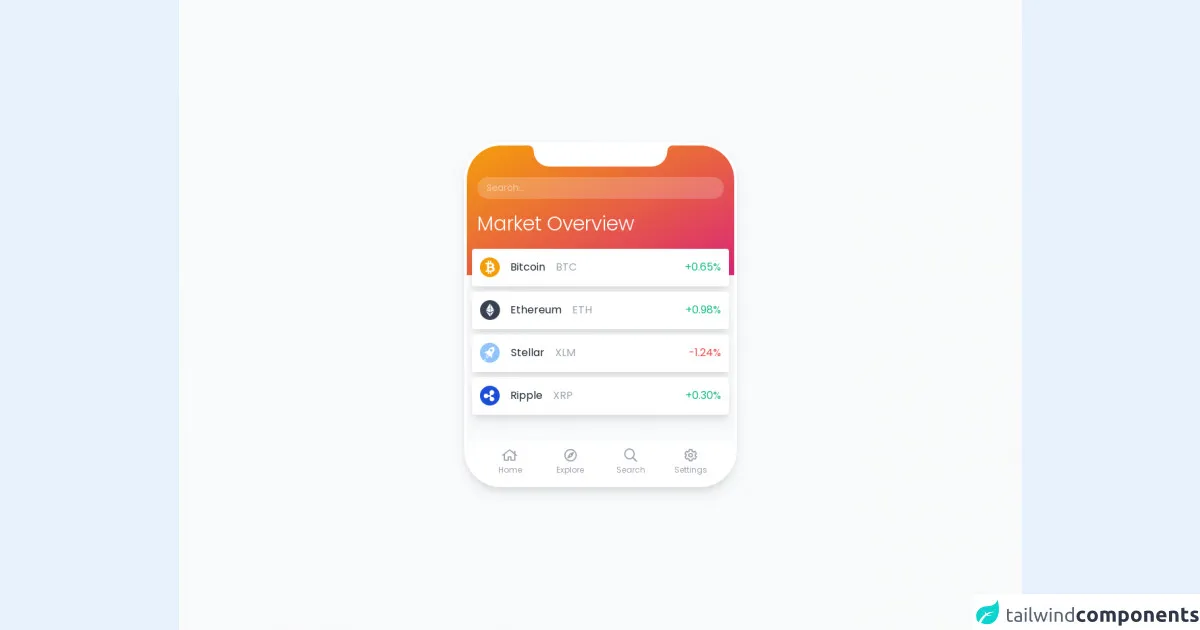
- The preview of Crypto App Design ui component.
- The source code of Crypto App Design ui component.
- How to create a Crypto App Design with Tailwind CSS?
- Conclusion
As the popularity of cryptocurrency continues to grow, more and more developers are creating crypto-related applications. One of the most important aspects of any application is its design. In this article, we will explore the most effective ways to build a crypto app design with Tailwind CSS.
What is Tailwind CSS?
Tailwind CSS is a utility-first CSS framework that allows developers to quickly and easily create custom designs. It provides a set of pre-defined classes that can be used to style HTML elements. Tailwind CSS is highly customizable and allows developers to create unique designs without writing any custom CSS.
The description of Crypto App Design ui component
A Crypto App Design UI component is a set of user interface elements that are used to create a cryptocurrency-related application. These components typically include charts, graphs, tables, and other data visualization tools. The design of these components should be clean, modern, and easy to use.
Why use Tailwind CSS to create a Crypto App Design ui component?
Tailwind CSS is an excellent choice for creating a Crypto App Design UI component for several reasons. First, it provides a set of pre-defined classes that can be used to quickly and easily style UI elements. This saves developers time and allows them to focus on other aspects of the application.
Second, Tailwind CSS is highly customizable. Developers can easily modify the default styles to create a unique design that fits their needs. This is particularly important for cryptocurrency-related applications, which often require custom data visualization tools.
Finally, Tailwind CSS is lightweight and fast. This is important for any web application, but particularly for cryptocurrency-related applications, which require real-time data updates.
The preview of Crypto App Design ui component.
Free download of the Crypto App Design's source code
The source code of Crypto App Design ui component.
<style>
    @import url('//fonts.googleapis.com/css2?family=Poppins:wght@100;200;300;400&display=swap');
    @import url(//pro.fontawesome.com/releases/v5.10.0/css/all.css);
    @import url(//cdn.jsdelivr.net/npm/cryptocoins-icons@2.9.0/webfont/cryptocoins.css);
    body {
        font-family: Poppins, sans-serif;
    }
    .rounded-4xl {
        border-radius: 3.5rem;
    }
    .phone-top {
        position: absolute;
        top: 0;
        left: 50%;
        transform: translateX(-50%);
        width: 50%;
        height: 3rem;
        z-index: 1;
    }
    .phone-top-inner {
        position: relative;
        height: 2rem;
        width: 100%;
        background-color: #fff;
        border-bottom-left-radius: 1.5rem;
        border-bottom-right-radius: 1.5rem;
    }
    .phone-top-inner:before {
        content: "";
        position: absolute;
        top: 0;
        left: -1rem;
        height: 1rem;
        width: 1rem;
        border-top-right-radius: 50%;
        box-shadow: 0.5rem -0.5rem 0 0 #fff;
    }
    .phone-top-inner:after {
        content: "";
        position: absolute;
        top: 0;
        right: -1rem;
        height: 1rem;
        width: 1rem;
        border-top-left-radius: 50%;
        box-shadow: -0.5rem -0.5rem 0 0 #fff;
    }
</style>

<div class="min-w-screen min-h-screen bg-gray-50 flex items-center justify-center px-3 py-5">
    <div class="w-full bg-white text-gray-800 overflow-hidden border-4 border-white rounded-4xl shadow-lg relative" style="max-width:414px;">
        <div class="phone-top"><div class="phone-top-inner"></div></div>
        <div class="w-full bg-gradient-to-br from-yellow-500 to-pink-600 pt-12 pb-12 px-4 text-white">
            <div class="mb-5">
                <input type="text" class="w-full text-white bg-white bg-opacity-20 rounded-full border-2 border-transparent focus:border-white focus:border-opacity-50 focus:outline-none px-3 py-1 leading-none text-sm transition-colors placeholder-white placeholder-opacity-50" placeholder="Search...">
            </div>
            <h1 class="text-3xl font-light mb-3">Market Overview</h1>
        </div>
        <div class="bg-gray-50 px-2">
            <ul class="relative -top-10">
                <li class="mb-2 bg-white p-3 shadow-lg rounded cursor-pointer transition-colors border-b-2 border-transparent hover:border-pink-500">
                    <div class="flex items-center">
                        <div class="w-16 text-3xl leading-none">
                            <i class="cc BTC text-yellow-500"></i>
                        </div>
                        <div class="w-full">Bitcoin <span class="ml-3 text-gray-400">BTC</span></div>
                        <div class="text-green-500">+0.65%</div>
                    </div>
                </li>
                <li class="mb-2 bg-white p-3 shadow-lg rounded cursor-pointer transition-colors border-b-2 border-transparent hover:border-pink-500">
                    <div class="flex items-center">
                        <div class="w-16 text-3xl leading-none">
                            <i class="cc ETH text-gray-700"></i>
                        </div>
                        <div class="w-full">Ethereum <span class="ml-3 text-gray-400">ETH</span></div>
                        <div class="text-green-500">+0.98%</div>
                    </div>
                </li>
                <li class="mb-2 bg-white p-3 shadow-lg rounded cursor-pointer transition-colors border-b-2 border-transparent hover:border-pink-500">
                    <div class="flex items-center">
                        <div class="w-16 text-3xl leading-none">
                            <i class="cc XLM text-blue-300"></i>
                        </div>
                        <div class="w-full">Stellar <span class="ml-3 text-gray-400">XLM</span></div>
                        <div class="text-red-500">-1.24%</div>
                    </div>
                </li>
                <li class="mb-2 bg-white p-3 shadow-lg rounded cursor-pointer transition-colors border-b-2 border-transparent hover:border-pink-500">
                    <div class="flex items-center">
                        <div class="w-16 text-3xl leading-none">
                            <i class="cc XRP text-blue-700"></i>
                        </div>
                        <div class="w-full">Ripple <span class="ml-3 text-gray-400">XRP</span></div>
                        <div class="text-green-500">+0.30%</div>
                    </div>
                </li>
            </ul>
        </div>
        <div class="px-5 bg-white pb-2">
            <div class="flex">
                <div class="flex-1 group">
                    <a href="#" class="flex items-end justify-center text-center mx-auto px-4 w-full text-gray-400 group-hover:text-pink-500 border-b-2 border-transparent group-hover:border-pink-500">
                        <span class="block px-1">
                            <i class="far fa-home text-xl pt-1 mb-1 block"></i>
                            <span class="block text-xs pb-1">Home</span>
                        </span>
                    </a>
                </div>
                <div class="flex-1 group">
                    <a href="#" class="flex items-end justify-center text-center mx-auto px-4 w-full text-gray-400 group-hover:text-pink-500 border-b-2 border-transparent group-hover:border-pink-500">
                        <span class="block px-1">
                            <i class="far fa-compass text-xl pt-1 mb-1 block"></i>
                            <span class="block text-xs pb-1">Explore</span>
                        </span>
                    </a>
                </div>
                <div class="flex-1 group">
                    <a href="#" class="flex items-end justify-center text-center mx-auto px-4 w-full text-gray-400 group-hover:text-pink-500 border-b-2 border-transparent group-hover:border-pink-500">
                        <span class="block px-1">
                            <i class="far fa-search text-xl pt-1 mb-1 block"></i>
                            <span class="block text-xs pb-1">Search</span>
                        </span>
                    </a>
                </div>
                <div class="flex-1 group">
                    <a href="#" class="flex items-end justify-center text-center mx-auto px-4 w-full text-gray-400 group-hover:text-pink-500 border-b-2 border-transparent group-hover:border-pink-500">
                        <span class="block px-1">
                            <i class="far fa-cog text-xl pt-1 mb-1 block"></i>
                            <span class="block text-xs pb-1">Settings</span>
                        </span>
                    </a>
                </div>
            </div>
        </div>
    </div>
</div>
How to create a Crypto App Design with Tailwind CSS?
Creating a Crypto App Design with Tailwind CSS is a straightforward process. Here are the steps to follow:
Install Tailwind CSS: The first step is to install Tailwind CSS. This can be done using npm or by including the Tailwind CSS CDN in your HTML file.
Create HTML markup: Once Tailwind CSS is installed, you can start creating the HTML markup for your Crypto App Design. This should include all of the necessary UI elements, such as charts, graphs, and tables.
Add Tailwind CSS classes: Next, you can start adding Tailwind CSS classes to your HTML elements. This will allow you to quickly and easily style your UI components. For example, you can use the "bg-blue-500" class to set the background color of an element to blue.
Customize styles: Once you have added the default Tailwind CSS classes, you can start customizing the styles to fit your needs. This can be done by modifying the default values in the Tailwind CSS configuration file.
Test and refine: Finally, you should test your Crypto App Design to ensure that it works as expected. You may need to make additional tweaks to the styles to get everything looking just right.
Conclusion
In conclusion, Tailwind CSS is an excellent choice for creating a Crypto App Design UI component. It provides a set of pre-defined classes that can be used to quickly and easily style UI elements, is highly customizable, and is lightweight and fast. By following the steps outlined in this article, you can create a custom Crypto App Design that is both functional and visually appealing.